
System today
The homelab runs media, documents, backups, home automation, and the tools I use to operate it. Ansible manages deployment across four machines, with shared definitions for routing, authentication, health checks, and backups.
The Service Registry brings that information together: what is running, what needs an update, and where resources are under pressure.
Service registry
Updates
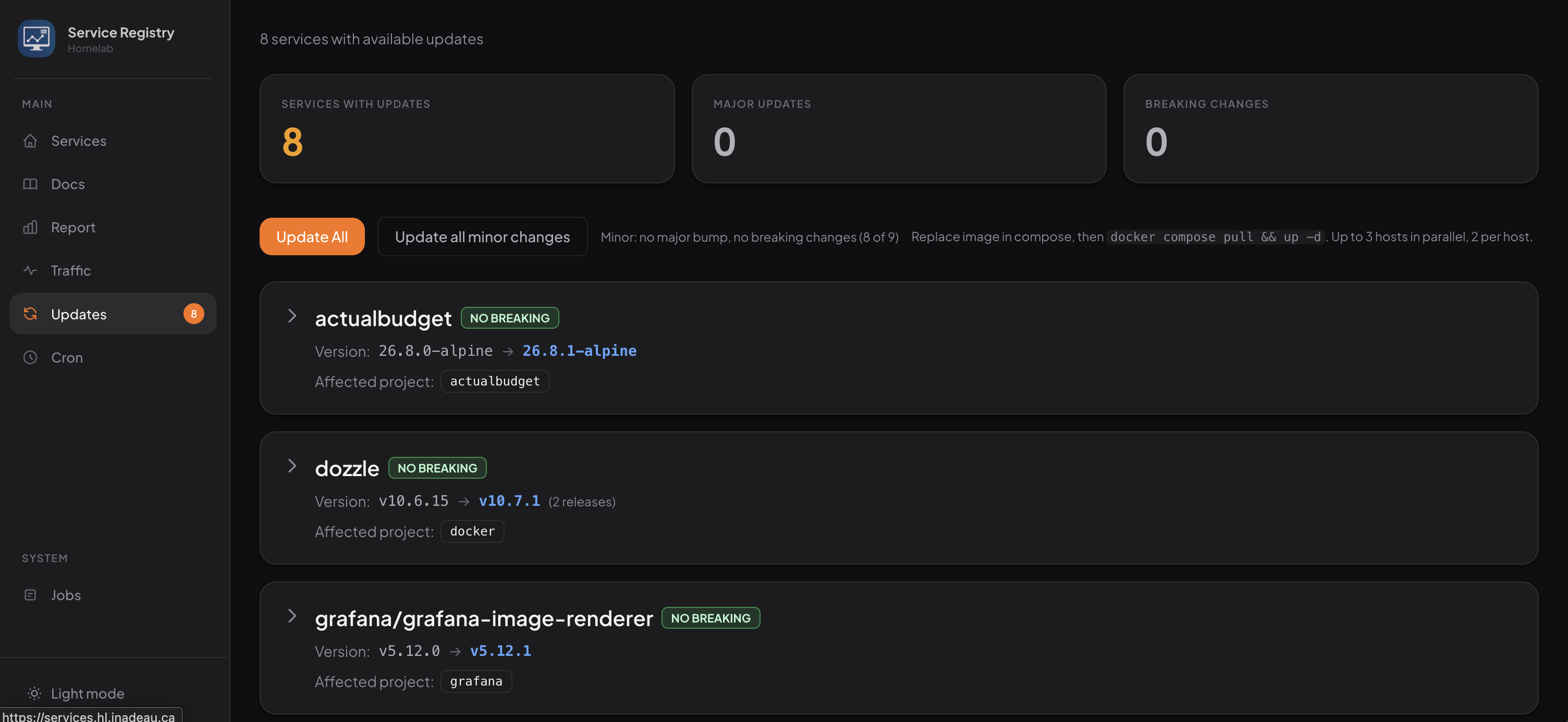
Uses What’s Up Docker ↗ to detect available image updates, then I can run a job that auto-updates the containers and commits changes back to the repository. It even detects major and breaking changes from the GitHub release notes.
Traffic
A traffic report shows which services send and receive the most data. More importantly, it shows which barely move any data at all, so I can remove them to save resources.
Health
A health report surfaces services hitting memory or CPU limits, making it easier to spot and fix performance problems.
Docs
Hosts documentation stored in the repository alongside the services it tracks.
Services
This data is fed by Gatus ↗, Beszel ↗, Docker, and other monitoring applications.
Hardware

01 · roc
Primary
Beelink SER8
- Ryzen 7 8845HS
- 32 GB RAM
- 1 TB + 2 TB NVMe
- ≈60 TB DAS
- Debian

02 · bluejay
Secondary
2019 MacBook Pro
- Core i9
- 32 GB RAM
- 1 TB NVMe
- Debian

03 · kinglet
Proxy node
Raspberry Pi 3B+
- Limited homelab access
- Isolated ingress and egress
- Debian

04 · robin
AI agent node
2020 M1 Mac Mini
- M1
- 16 GB RAM
- macOS
My homelab is built around a primary node (roc). The primary node houses a core Caddy server ↗ that reverse-proxies to the other services and nodes on the network.
The entire system is managed with Ansible ↗, which makes it straightforward to deploy and manage services across the network. All services are generally hosted via Docker Compose, save for a select few metal services (like a Beszel Agent ↗).
Everything is reachable over Tailscale, so it is not exposed to the public internet. That keeps the system private and easier to secure.
The secondary node (bluejay) is a repurposed 2019 MacBook Pro. The primary node proxies to the secondary node.
The proxy node (kinglet) is a Raspberry Pi 3B+ that exposes a limited set of services to a less secure environment, such as my Kobo. If the Kobo were lost, the homelab would stay secure.
Finally, the AI agent node (robin) is a 2020 M1 Mac Mini used to run AI agents (primarily Codex and ChatGPT these days). It is isolated from the rest of the network, with its own Apple ID and GitHub account. I can SSH into it over Tailscale, but it cannot SSH back out. It reaches select data through a few custom MCP servers on port 8443 rather than 443.
I chose to name all the nodes after birds, as a nod to the birds that visit my Northern Woods ↗ property.
Hardware metrics
Touch or hover over a chart to explore. With a keyboard, focus a chart and use the arrow keys.
CPU
RAM
Network sent
Network received
Mapping live hosts…
Timeline
December 2024: First steps
The repository starts in mid-December 2024. It wasn’t the first experiment with home servers, but it encompasses the first use of Ansible. Previous attempts used Terraform, raw docker-compose.yml files, hand-spun services, and other config-as-code systems. These attempts mirrored my day-to-day work life, which was also my mistake. Technologies like Terraform and Puppet were meant more for cloud compute than system administration. That is to say, they set up ephemeral cloud nodes well with a few-service, one-system setup, but did not manage a many-service, one-system setup well.
It wasn’t until this round of experiments that I figured out that Ansible was a good solution for system administration.
The first role managed Plex and a few sidecar services in raw docker-compose setups, such as Beszel and Dozzle.
Notable additions during the first few weeks:
- Dozzle and Beszel.
- Homepage.
- ntfy.
- UPS management, automated drive mounts, Docker, and base OS roles.
This is the first recognizable form of the experiment. Ansible is being used to reproduce a real home server with services introduced as discrete roles rather than hand-built Compose files.
January–February 2025: Homelab platform
During this time period, I invited a friend of mine to work in the same repo. We had many of the same goals, and so sharing the common architecture was a good way to reduce maintenance burden, share lessons, and bring alternative opinions along the way.
My friend added their server. This addition prompted an organization of the Ansible inventory with a proper split of group and host variables. It also prompted a more serious look at backups, which is when we added Backrest.
As the homelab repo was now managing multiple setups, we also moved to fully automate Tailscale + Cloudflare setup so a selected *.internal.domain.com-style wildcard worked to route traffic from clients to the server at home. The A record simply points to a Tailscale internal IP address.
During this organization, I also cleaned up the compose versions and pinned all docker versions in a consolidated inventory/group_vars/all/docker.yml file. This made for an easy, at-a-glance way to check and update Docker versions.
This was also the time I wanted to get more serious about monitoring, so I integrated the first Grafana/VictoriaMetrics/logging stack, Speedtest monitoring for my home internet, and Gatus uptime monitoring.
An aside: I also started managing my Mac laptop through Ansible, the first Mac client!
March–June 2025: Operations and household applications
The next phase fills practical gaps rather than changing the architecture:
- AdventureLog: This is a platform that’s meant for travel planning. It was something I tried. Ultimately I did not continue with it.
- Database-aware backup jobs and raw Backblaze backups: While Backrest did a great job for backing up the general system, I wanted specific database-aware jobs, and I wanted to ensure that core and important files were available as raw encrypted backups directly on Backblaze without requiring any external services to interpret or render the backup data.
- Dovecot mail: My Gmail account was full, so I archived years of email and still wanted this available. So I set up Dovecot to make that still available in my email client and make it searchable.
- Paperless-ngx: Paperless-ngx is a documentation scanning system. It pulls in any scans that you give it, PDFs, etc., and can hook up to email. This is hooked up to all of my email accounts to automatically ingest all attachments and make them easily searchable, categorizable, and taggable.
- Homebox: I wanted something that could track the larger-ticket items in my home as well as the more tedious, numerous things in case of flood or fire so that I would have something easy and trackable for an insurance agent. This is of course backed up because if I have a fire in my home, the server is probably gone too.
By this point the experiment covers media, documents, inventory, mail, backups, metrics, logs, and uptime.
July–August 2025: CI, metadata, least privilege, and a service catalogue
We began to start treating the repository like a maintained software platform:
- Added self-hosted GitHub Actions runners and linting.
- Split the server registry into structured inventory and validated its schema using OpenAPI schemas that we maintained in the repo. This ensured we didn’t add something new in an unexpected format.
- Built a Caddy-backed service/health interface and better organized the Caddyfile.
- Added Warracker (warranty tracking) and Discount Bandit (price monitoring) as experiments. Neither of these has continued to be used, and both have been removed.
- Applied the major least-privilege pass by derooting all Docker setups and ensuring per-service users.
Much of this was landed as we continued to experiment across multiple people and kept landing changes that would work in our own setup but would fail in the other person’s setup. While much of it worked and landed in our main branch, others did not. For example, an early role-test prototype also added role test workflows, but it was closed without merge as it wasn’t feasible to get running. It is useful as evidence of the direction toward systematic role validation, even though that branch itself did not land.
September–December 2025: Household and personal applications
New household and personal applications become the main story. I wanted solutions for note-taking, budgeting, self-hosted calendars and contact management, and more.
- AFFiNE notes: This was one of many note-taking apps I tried to self-host, but found it overly complicated and resource intensive. I ultimately dropped this and tried a number of other apps before subscribing to Craft.
- Home Assistant: This wasn’t the first foray into Home Assistant, but it has stuck around. It has a few useful automations, but I haven’t been able to deeply integrate it yet. I find Home Assistant a little too UI-config heavy for an automated homelab, whereas I prefer better YAML- or TOML-based, Git-versioned workflows.
- Actual Budget: I integrated budgeting software that I’ve used ever since. This is integrated with a local connection into my banking software for automatic import rather than using a hosted service like SimpleFIN, Plaid, or other online services. You have to give them your bank password. This has worked exceptionally well for me and I’ve been able to start keeping a monthly track of what I spend.
- RustiCal: I chose RustiCal for calendar and contact management because it is written in Rust. Around this time I started pulling more Rust and Go into the system and avoiding things written in languages like Java, Python, and Ruby where possible, just because I find Go and Rust so much more resource-efficient. This was a decision largely driven by the fact that I have limited space in my apartment so I can’t add more servers, and servers are also getting way more expensive due to rising costs related to RAM and storage.
- LLM Proxy and an internal registry: I started experimenting with hosting LLMs. My home servers are pretty powerful, but they run a lot and so I can’t dedicate the entire system to hosting the LLM. And so I never end up being able to host something powerful enough to use day to day. To this day I still hope I’m able to host a very small model to interact with MCP servers in my own home server system, such as my memos, to-dos, calendars, etc.
The service collection now reflects more day-to-day life, rather than just luxuries. I have experiments with note-taking, money management, books, media, calendars, and home automation.
January–February 2026: Services UI, authentication, and secrets
Bluejay joined the inventory on January 19, 2026, in the initial host commit. The host was a repurposed 2019 Intel MacBook Pro running Debian Trixie, with an initial playbook covering the Linux base, AMD graphics support, Tailscale, Docker, What’s Up Docker, and Dozzle. It soon became a second home for services and later a key target for agent-operated deployments.
This is the largest architectural expansion in the repo.
I added an internal Services application to help manage the homelab. See the Service Registry above.
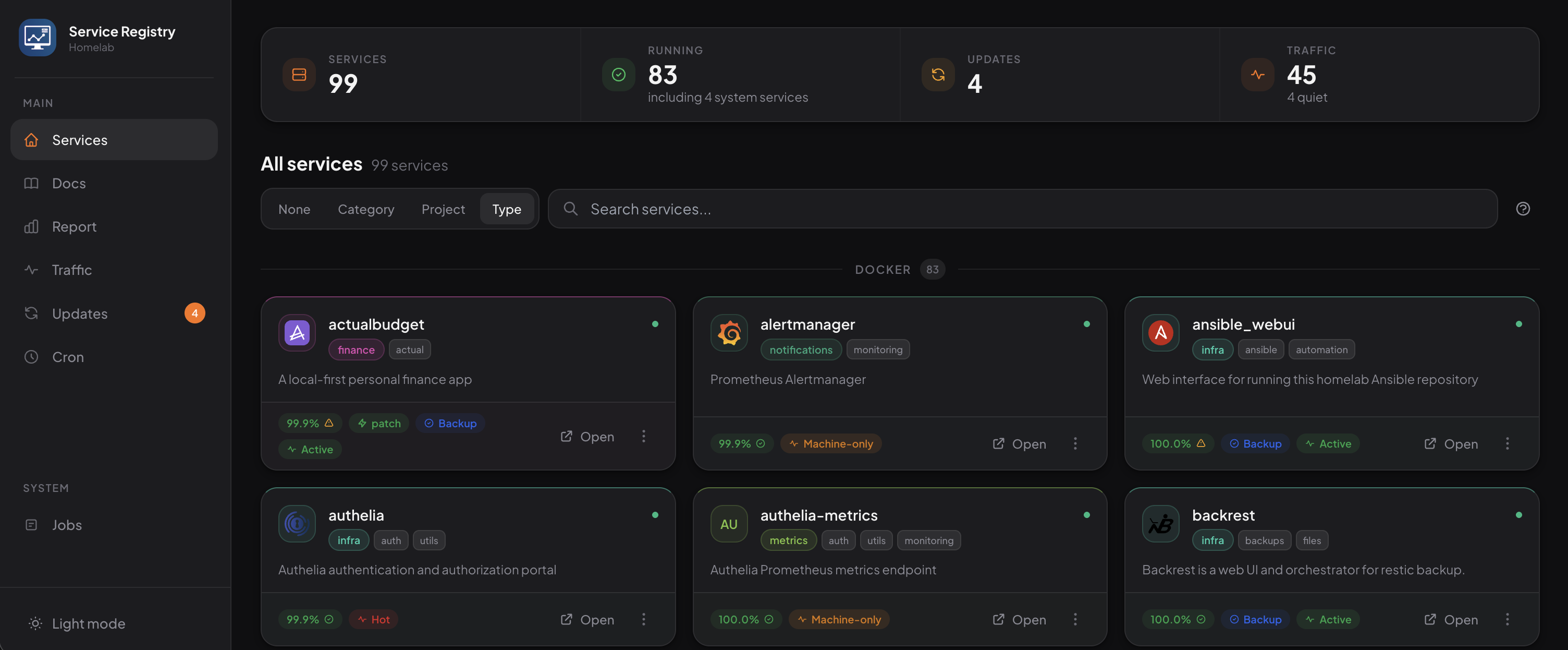
The app grows over this time into an operational console with release/update tracking using What’s Up Docker and GitHub release notes. It adds more metadata, search, resource-limit reports of each service, documentation rendering, and Backups/Gatus/Grafana integration.
At the same time, Caddy and Gatus become fully automated based on a server.yml definition. Below is an example for Immich that defines metadata for rendering in the services application, deployment resource limits for the docker-compose.yml file, endpoint information for Caddy, auth information, backup information, and uptime monitoring information. All of this is used to either power the Ansible deployment itself or the services application.
---
servers:
  immich:
    metadata:
      icon: immich
      tags: [tracker, images]
      description: High performance self-hosted photo and video management solution.
      repository: https://github.com/immich-app/immich
      category: photos
    deployment:
      container: immich_server
      resources:
        memory: 4G
        cpus: '2'
        notes: Photo/video server; API, thumbnails, transcoding.
    endpoint:
      upstream: immich_server
      port: 2283
      network: files
      auth:
        mode: oidc
    health:
      path: /api/server/ping
      conditions: ['[STATUS] == 200', '[BODY].res == pong']
    backup:
      type: postgresql
      schedule: 10 * * * *  # Hourly at :10 past the hour
      retention: 7 days
      location: <data_dir>/immich/backups
At the same time, I added:
- Domains monitoring: make sure nothing is about to expire and SSL works.
- Project Zomboid game server: for a friend and I to play online together.
- Stronger SSH controls, like removing password auth and Tailscale SSH policy hardening.
- Authelia as a common forward-auth/OIDC layer for all apps that support it.
- HashiCorp Vault for generated and managed service credentials. This sits alongside Ansible Vault (where API keys and third-party auth go). HashiCorp Vault is meant for auto-generated values provided during a service’s setup.
During this period, the experiment turns into a mature and coherent private platform. All applications have consistent identity, routing, secrets, health, documentation, and operational controls.
March–April 2026: Observability, MCP, and self-hosted collaboration
During this time I started to experiment more with AI generation. While the core of the repository was written by hand, AI started to have more of a role in the ongoing maintenance. With strong foundations in the format and outlines of roles, AI has been useful in experimenting with new services and fixing issues that pop up.
To that end, I started to add additional MCP servers for things like logging and metrics, and AI auto-setup systems.
Memos with an MCP sidecar is sort of like a self-hosted Twitter. I wanted to experiment with what it would be like to allow AI agents to assume an identity and “tweet” about their work, then let other agents read that work for knowledge and information. Today there are over 700 memos on this service, clustered into topic groups from work AI agents did.

I also added MCP servers for VictoriaLogs and VictoriaMetrics. These servers allow questions about failures in the services and subsequent targeted fixes for small issues.
Other experiments:
- Kiwix: an experiment for offline data. I anticipate this will be useful at the rural property in case of an internet outage.
- Mindustry: we became bored with Project Zomboid and spent some time playing Mindustry.
- Forgejo with GitHub mirroring: GitHub started having more outages, so I wanted to have backups of my repos just in case.
- Vaultwarden with OIDC and managed backups: This allows free, shared, secure password management at home.
Mac provisioning also expands to manage Cursor, OpenCode, Codex, skills, and MCP configuration. The homelab is no longer deploying only services; it is also deploying the tools and agents used to operate and document those services.
May–June 2026: Solar data and an isolated agent host
During this time I started to write in Rockroot’s repositories and wanted some real-world data. I wrote cron jobs to auto-pull data like EcoFlow and Victron solar data. This data was not yet hooked up into any external services, but the data was being effectively pulled into the repo.
I also started hardening a separate M1 Mac Mini (Robin) for AI agent usage. I wanted somewhere safer for my AI agent work to run without the risk of it assuming my identity to SSH into servers and log into applications. I moved the M1 onto its own Wi-Fi, Apple ID, and GitHub account. While it runs Tailscale, I don’t allow it to use SSH and only allow it to access port 8443 on the primary host (roc). Port 8443 on roc is a Caddy server that can reverse proxy to MCP servers and a few hand-selected metadata endpoints. This allowed me to give the AI agent more free rein over the computer as it was isolated from my actual home.
July–August 2026: Restricted access and deployment checks
The final phase is dominated by making the platform safer and easier for all use cases.
- Add Kinglet with a focused Caddy proxy and UFW role: I have a Kobo e-reader hooked up to my homelab. It runs Tailscale, which I realized was a security risk. Tailscale allowed this relatively unprotected device to connect to any service on my server, rather than isolating it to just the select endpoint that provides access to e-books I’ve purchased. While I tried using the same trick I used for MCP servers, using port 8443, I found that there was a bug in the URL resolution software that disallowed using anything but port 443. By using an old Raspberry Pi, I’ve set up a separate system with its own
*.kb.int.domain.comsetup and made sure that it can only proxy to the specific endpoint needed. - Deploy Ansible WebUI. While the Mac Mini was able to isolate all changes, it was no longer able to properly validate Ansible changes. I set this up with check-only mode on to allow the Mac Mini to push a branch and subsequently validate the results without allowing it to change my homelab.
- Compose shared agent instructions for Codex, Cursor, OpenCode, and Claude.
- Switch from Splitwise to SplitPro: allows for full control over my financial data.
- Add Mindwtr TODO management software with an MCP server and a two-way Craft task sync.
- Redesigned and consolidated server.yml definitions and started to better generate Ansible playbooks based on service placement, rather than hand-rolling them. This removed some complexity in management and made it deterministic to tell where a service was running (if at all) in a given deployment.

Conversation
Add a note.
Questions, corrections, and useful tangents are welcome. Sign in to join the conversation.